
diff options
| author | Mark Murphy <mail@markmurphydev.com> | 2025-01-16 17:37:10 -0500 |
|---|---|---|
| committer | Mark Murphy <mail@markmurphydev.com> | 2025-01-17 15:55:38 -0500 |
| commit | 240622526622e43a93c9cfb1fa5e773e327b491f (patch) | |
| tree | 4b3646d6dcbba731524a2ccf3cc97c0b4a853743 /src/tools/rust-analyzer/docs/dev | |
| parent | 99c701307094b6bad58b8df796fa00de0fe0935b (diff) | |
| download | rust-240622526622e43a93c9cfb1fa5e773e327b491f.tar.gz rust-240622526622e43a93c9cfb1fa5e773e327b491f.zip | |
Update syntax tree viewer docs
Diffstat (limited to 'src/tools/rust-analyzer/docs/dev')
| -rw-r--r-- | src/tools/rust-analyzer/docs/dev/README.md | 16 |
1 files changed, 9 insertions, 7 deletions
diff --git a/src/tools/rust-analyzer/docs/dev/README.md b/src/tools/rust-analyzer/docs/dev/README.md index cd0f49174cd..3ba492e0959 100644 --- a/src/tools/rust-analyzer/docs/dev/README.md +++ b/src/tools/rust-analyzer/docs/dev/README.md @@ -154,19 +154,21 @@ There are also several VS Code commands which might be of interest: * `rust-analyzer: Status` shows some memory-usage statistics. -* `rust-analyzer: Syntax Tree` shows syntax tree of the current file/selection. - * `rust-analyzer: View Hir` shows the HIR expressions within the function containing the cursor. - You can hover over syntax nodes in the opened text file to see the appropriate - rust code that it refers to and the rust editor will also highlight the proper - text range. +* If `rust-analyzer.showSyntaxTree` is enabled in settings, `Rust Syntax Tree: Focus on Rust Syntax Tree View` shows the syntax tree of the current file. + + You can click on nodes in the rust editor to go to the corresponding syntax node. + + You can click on `Reveal Syntax Element` next to a syntax node to go to the corresponding rust code and highlight the proper text range. If you trigger Go to Definition in the inspected Rust source file, - the syntax tree read-only editor should scroll to and select the + the syntax tree view should scroll to and select the appropriate syntax node token. - 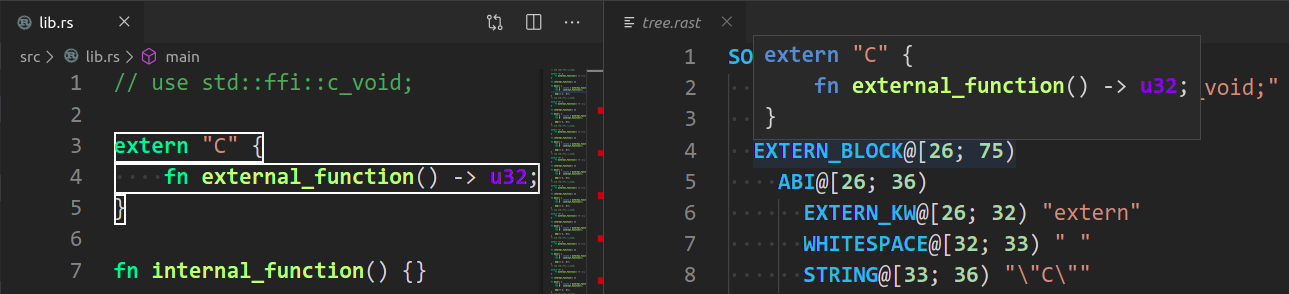 + You can click on `Copy` next to a syntax node to copy a text representation of the node. + +  ## Profiling |