
diff options
| author | Veetaha <gerzoh1@gmail.com> | 2020-02-16 22:58:17 +0200 |
|---|---|---|
| committer | Veetaha <gerzoh1@gmail.com> | 2020-02-16 23:00:10 +0200 |
| commit | 64112b0b61cd842f2186240374a89ae05a8d0bb9 (patch) | |
| tree | 0578ad5b2a81e8126cb4f180f777023ef92a9946 /docs/dev/debugging.md | |
| parent | 43a41819cbb1d400c8787936e3d35b8b65c55a29 (diff) | |
| download | rust-64112b0b61cd842f2186240374a89ae05a8d0bb9.tar.gz rust-64112b0b61cd842f2186240374a89ae05a8d0bb9.zip | |
docs: update debugging.md with the freshest VSCode debugging information
Diffstat (limited to 'docs/dev/debugging.md')
| -rw-r--r-- | docs/dev/debugging.md | 61 |
1 files changed, 43 insertions, 18 deletions
diff --git a/docs/dev/debugging.md b/docs/dev/debugging.md index f868e6998f7..5a942ba5de3 100644 --- a/docs/dev/debugging.md +++ b/docs/dev/debugging.md @@ -1,34 +1,58 @@ # Debugging vs Code plugin and the Language Server -Install [LLDB](https://lldb.llvm.org/) and the [LLDB Extension](https://marketplace.visualstudio.com/items?itemName=vadimcn.vscode-lldb). +## Prerequsities -Checkout rust rust-analyzer and open it in vscode. +- Install [LLDB](https://lldb.llvm.org/) and the [LLDB Extension](https://marketplace.visualstudio.com/items?itemName=vadimcn.vscode-lldb) VSCode extensions. +- Open the root folder in VSCode. Here you can access the preconfigured debug setups. -``` -$ git clone https://github.com/rust-analyzer/rust-analyzer.git --depth 1 -$ cd rust-analyzer -$ code . -``` + <img height=150px src="https://user-images.githubusercontent.com/36276403/74611090-92ec5380-5101-11ea-8a41-598f51f3f3e3.png" alt="Debug options view"> + +- Install all TypeScript dependencies + ```bash + cd editors/code + npm i + ``` + +## Common knowledge + +* All debug configurations open new `[Extension Development Host]` VSCode instance +where **only** your `rust-analyzer` extension is enabled. +* To activate the extension you need to open any Rust project folder in `[Extension Development Host]`. -- To attach to the `lsp server` in linux you'll have to run: - `echo 0 | sudo tee /proc/sys/kernel/yama/ptrace_scope` +## Debug TypeScript VSCode extension - This enables ptrace on non forked processes +- `Run Extension` - runs the extension with globally installed `ra_lsp_server` binary. +- `Run Extension (Dev Server)` - runs extension with binary from your locally built `target/debug/ra_lsp_server`. -- Ensure the dependencies for the extension are installed, run the `npm: install - editors/code` task in vscode. +TypeScript debugging is configured to watch your source edits and recompile. +To apply changes to already running debug process press <kbd>Ctrl+Shift+P</kbd> and run the following command in your `[Extension Development Host]` + +``` +> Developer: Reload Window +``` + +## Debug Rust LSP server + +- To attach to the `lsp server` in linux you'll have to run: -- Launch the `Debug Extension`, this will build the extension and the `lsp server`. + ``` + echo 0 | sudo tee /proc/sys/kernel/yama/ptrace_scope + ``` -- A new instance of vscode with `[Extension Development Host]` in the title. + This enables ptrace on non-forked processes - Don't worry about disabling `rls` all other extensions will be disabled but this one. +- Enable debug symbols in `Cargo.toml`: + ```toml + [profile.dev] + debug = 2 + ``` -- In the new vscode instance open a rust project, and navigate to a rust file +- Select `Run Extension (Dev Server)` to run your local built `target/debug/ra_lsp_server`. -- In the original vscode start an additional debug session (the three periods in the launch) and select `Debug Lsp Server`. +- In the original VSCode window once again select `Attach To Server` debug configuration. -- A list of running processes should appear select the `ra_lsp_server` from this repo. +- A list of running processes should appear. Select the `ra_lsp_server` from this repo. - Navigate to `crates/ra_lsp_server/src/main_loop.rs` and add a breakpoint to the `on_task` function. @@ -36,7 +60,8 @@ $ code . ## Demo -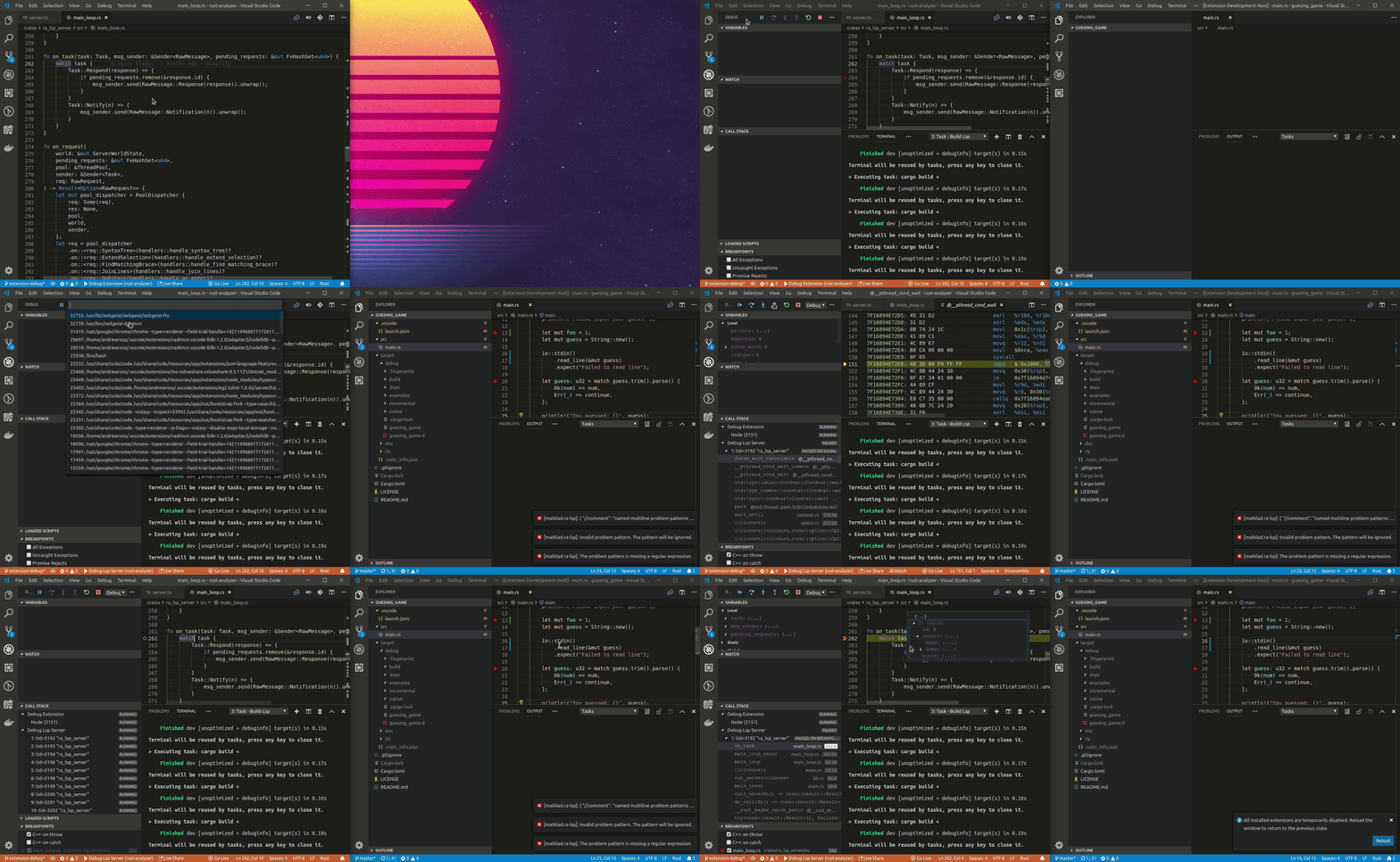 +- [Debugging TypeScript VScode extension](https://www.youtube.com/watch?v=T-hvpK6s4wM). +- [Debugging Rust LSP server](https://www.youtube.com/watch?v=EaNb5rg4E0M). ## Troubleshooting |