
diff options
| author | Boxy <rust@boxyuwu.dev> | 2025-01-29 16:46:09 +0000 |
|---|---|---|
| committer | GitHub <noreply@github.com> | 2025-01-29 16:46:09 +0000 |
| commit | 0b4890851287f7552e25beb43ab67243a87a1ff4 (patch) | |
| tree | 6b28cb50611b2bbcca661aaef967dd4a6eb7f26f /src/tools/rust-analyzer/docs/dev | |
| parent | bec4359db9bf5fd3c6e9d4a88d26dcf091b3c82a (diff) | |
| parent | 815c5d4eee36e836c7b75aa9288a58c4e8e7830b (diff) | |
| download | rust-0b4890851287f7552e25beb43ab67243a87a1ff4.tar.gz rust-0b4890851287f7552e25beb43ab67243a87a1ff4.zip | |
Rustc pull
Diffstat (limited to 'src/tools/rust-analyzer/docs/dev')
| -rw-r--r-- | src/tools/rust-analyzer/docs/dev/README.md | 16 | ||||
| -rw-r--r-- | src/tools/rust-analyzer/docs/dev/lsp-extensions.md | 19 |
2 files changed, 27 insertions, 8 deletions
diff --git a/src/tools/rust-analyzer/docs/dev/README.md b/src/tools/rust-analyzer/docs/dev/README.md index cd0f49174cd..3ba492e0959 100644 --- a/src/tools/rust-analyzer/docs/dev/README.md +++ b/src/tools/rust-analyzer/docs/dev/README.md @@ -154,19 +154,21 @@ There are also several VS Code commands which might be of interest: * `rust-analyzer: Status` shows some memory-usage statistics. -* `rust-analyzer: Syntax Tree` shows syntax tree of the current file/selection. - * `rust-analyzer: View Hir` shows the HIR expressions within the function containing the cursor. - You can hover over syntax nodes in the opened text file to see the appropriate - rust code that it refers to and the rust editor will also highlight the proper - text range. +* If `rust-analyzer.showSyntaxTree` is enabled in settings, `Rust Syntax Tree: Focus on Rust Syntax Tree View` shows the syntax tree of the current file. + + You can click on nodes in the rust editor to go to the corresponding syntax node. + + You can click on `Reveal Syntax Element` next to a syntax node to go to the corresponding rust code and highlight the proper text range. If you trigger Go to Definition in the inspected Rust source file, - the syntax tree read-only editor should scroll to and select the + the syntax tree view should scroll to and select the appropriate syntax node token. - 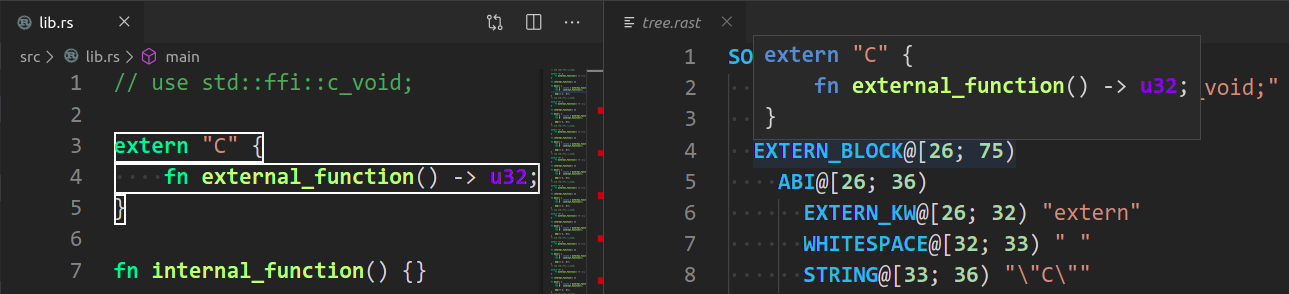 + You can click on `Copy` next to a syntax node to copy a text representation of the node. + +  ## Profiling diff --git a/src/tools/rust-analyzer/docs/dev/lsp-extensions.md b/src/tools/rust-analyzer/docs/dev/lsp-extensions.md index 21ac3a5a269..a632fc6f5fb 100644 --- a/src/tools/rust-analyzer/docs/dev/lsp-extensions.md +++ b/src/tools/rust-analyzer/docs/dev/lsp-extensions.md @@ -1,5 +1,5 @@ <!--- -lsp/ext.rs hash: 6dd762ae19630ec0 +lsp/ext.rs hash: 2d8604825c458288 If you need to change the above hash to make the test pass, please check if you need to adjust this doc as well and ping this issue: @@ -710,6 +710,23 @@ interface SyntaxTreeParams { Returns textual representation of a parse tree for the file/selected region. Primarily for debugging, but very useful for all people working on rust-analyzer itself. +## View Syntax Tree + +**Method:** `rust-analyzer/viewSyntaxTree` + +**Request:** + +```typescript +interface ViewSyntaxTreeParams { + textDocument: TextDocumentIdentifier, +} +``` + +**Response:** `string` + +Returns json representation of the file's syntax tree. +Used to create a treeView for debugging and working on rust-analyzer itself. + ## View Hir **Method:** `rust-analyzer/viewHir` |