
diff options
| author | Laurențiu Nicola <lnicola@users.noreply.github.com> | 2025-01-18 15:59:22 +0000 |
|---|---|---|
| committer | GitHub <noreply@github.com> | 2025-01-18 15:59:22 +0000 |
| commit | b8eec1a35efb933bff2dc8467b2a632251734aec (patch) | |
| tree | 8beab4afe7a6fa942052fbf19637437c5741495e /src/tools/rust-analyzer/docs/dev | |
| parent | 013130c22cdf4f0cc0ea177571b87333f7c7ddef (diff) | |
| parent | 240622526622e43a93c9cfb1fa5e773e327b491f (diff) | |
Merge pull request #18957 from markmurphydev/docs_vscode_syntax_tree
Update syntax tree viewer docs
Diffstat (limited to 'src/tools/rust-analyzer/docs/dev')
| -rw-r--r-- | src/tools/rust-analyzer/docs/dev/README.md | 16 |
1 files changed, 9 insertions, 7 deletions
diff --git a/src/tools/rust-analyzer/docs/dev/README.md b/src/tools/rust-analyzer/docs/dev/README.md index cd0f49174cd..3ba492e0959 100644 --- a/src/tools/rust-analyzer/docs/dev/README.md +++ b/src/tools/rust-analyzer/docs/dev/README.md @@ -154,19 +154,21 @@ There are also several VS Code commands which might be of interest: * `rust-analyzer: Status` shows some memory-usage statistics. -* `rust-analyzer: Syntax Tree` shows syntax tree of the current file/selection. - * `rust-analyzer: View Hir` shows the HIR expressions within the function containing the cursor. - You can hover over syntax nodes in the opened text file to see the appropriate - rust code that it refers to and the rust editor will also highlight the proper - text range. +* If `rust-analyzer.showSyntaxTree` is enabled in settings, `Rust Syntax Tree: Focus on Rust Syntax Tree View` shows the syntax tree of the current file. + + You can click on nodes in the rust editor to go to the corresponding syntax node. + + You can click on `Reveal Syntax Element` next to a syntax node to go to the corresponding rust code and highlight the proper text range. If you trigger Go to Definition in the inspected Rust source file, - the syntax tree read-only editor should scroll to and select the + the syntax tree view should scroll to and select the appropriate syntax node token. - 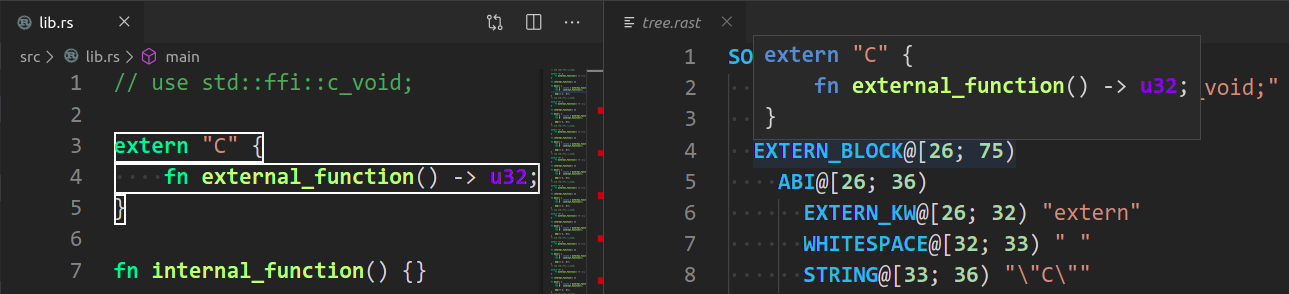 + You can click on `Copy` next to a syntax node to copy a text representation of the node. + +  ## Profiling |