
diff options
| author | Boxy <rust@boxyuwu.dev> | 2025-01-28 11:57:19 +0000 |
|---|---|---|
| committer | Boxy <rust@boxyuwu.dev> | 2025-01-28 11:57:19 +0000 |
| commit | 815c5d4eee36e836c7b75aa9288a58c4e8e7830b (patch) | |
| tree | d4e7e89bcb0f3fd8e1ad2004c2c4a3dab933aaed /src/tools/rust-analyzer/docs | |
| parent | 62102ee041d0681e507e16c6d17ff5798b3a9d9f (diff) | |
| parent | 66d6064f9eb888018775e08f84747ee6f39ba28e (diff) | |
Merge from rustc
Diffstat (limited to 'src/tools/rust-analyzer/docs')
| -rw-r--r-- | src/tools/rust-analyzer/docs/dev/README.md | 16 | ||||
| -rw-r--r-- | src/tools/rust-analyzer/docs/dev/lsp-extensions.md | 19 | ||||
| -rw-r--r-- | src/tools/rust-analyzer/docs/user/generated_config.adoc | 32 |
3 files changed, 53 insertions, 14 deletions
diff --git a/src/tools/rust-analyzer/docs/dev/README.md b/src/tools/rust-analyzer/docs/dev/README.md index cd0f49174cd..3ba492e0959 100644 --- a/src/tools/rust-analyzer/docs/dev/README.md +++ b/src/tools/rust-analyzer/docs/dev/README.md @@ -154,19 +154,21 @@ There are also several VS Code commands which might be of interest: * `rust-analyzer: Status` shows some memory-usage statistics. -* `rust-analyzer: Syntax Tree` shows syntax tree of the current file/selection. - * `rust-analyzer: View Hir` shows the HIR expressions within the function containing the cursor. - You can hover over syntax nodes in the opened text file to see the appropriate - rust code that it refers to and the rust editor will also highlight the proper - text range. +* If `rust-analyzer.showSyntaxTree` is enabled in settings, `Rust Syntax Tree: Focus on Rust Syntax Tree View` shows the syntax tree of the current file. + + You can click on nodes in the rust editor to go to the corresponding syntax node. + + You can click on `Reveal Syntax Element` next to a syntax node to go to the corresponding rust code and highlight the proper text range. If you trigger Go to Definition in the inspected Rust source file, - the syntax tree read-only editor should scroll to and select the + the syntax tree view should scroll to and select the appropriate syntax node token. - 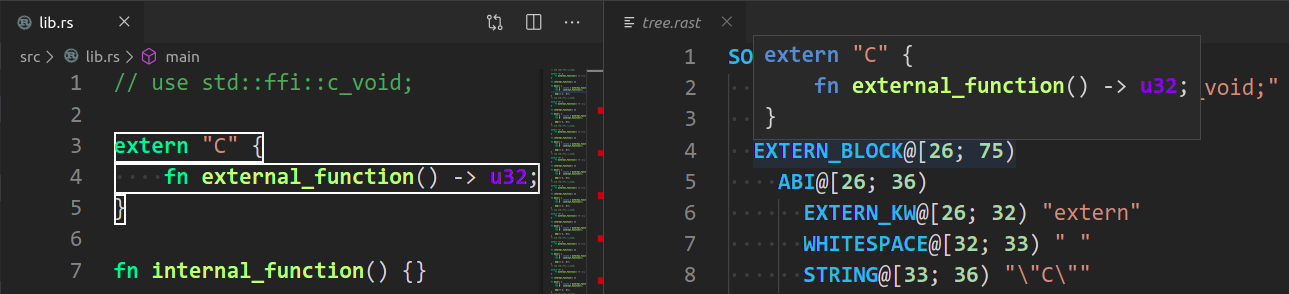 + You can click on `Copy` next to a syntax node to copy a text representation of the node. + +  ## Profiling diff --git a/src/tools/rust-analyzer/docs/dev/lsp-extensions.md b/src/tools/rust-analyzer/docs/dev/lsp-extensions.md index 21ac3a5a269..a632fc6f5fb 100644 --- a/src/tools/rust-analyzer/docs/dev/lsp-extensions.md +++ b/src/tools/rust-analyzer/docs/dev/lsp-extensions.md @@ -1,5 +1,5 @@ <!--- -lsp/ext.rs hash: 6dd762ae19630ec0 +lsp/ext.rs hash: 2d8604825c458288 If you need to change the above hash to make the test pass, please check if you need to adjust this doc as well and ping this issue: @@ -710,6 +710,23 @@ interface SyntaxTreeParams { Returns textual representation of a parse tree for the file/selected region. Primarily for debugging, but very useful for all people working on rust-analyzer itself. +## View Syntax Tree + +**Method:** `rust-analyzer/viewSyntaxTree` + +**Request:** + +```typescript +interface ViewSyntaxTreeParams { + textDocument: TextDocumentIdentifier, +} +``` + +**Response:** `string` + +Returns json representation of the file's syntax tree. +Used to create a treeView for debugging and working on rust-analyzer itself. + ## View Hir **Method:** `rust-analyzer/viewHir` diff --git a/src/tools/rust-analyzer/docs/user/generated_config.adoc b/src/tools/rust-analyzer/docs/user/generated_config.adoc index 5b86766aa8e..bd091db58d3 100644 --- a/src/tools/rust-analyzer/docs/user/generated_config.adoc +++ b/src/tools/rust-analyzer/docs/user/generated_config.adoc @@ -94,10 +94,10 @@ avoid checking unnecessary things. -- Default: ---- -{ - "miri": null, - "debug_assertions": null -} +[ + "debug_assertions", + "miri" +] ---- List of cfg options to enable with the given values. @@ -716,6 +716,11 @@ Whether to show generic type parameter name inlay hints. -- Whether to show implicit drop hints. -- +[[rust-analyzer.inlayHints.implicitSizedBoundHints.enable]]rust-analyzer.inlayHints.implicitSizedBoundHints.enable (default: `false`):: ++ +-- +Whether to show inlay hints for the implied type parameter `Sized` bound. +-- [[rust-analyzer.inlayHints.lifetimeElisionHints.enable]]rust-analyzer.inlayHints.lifetimeElisionHints.enable (default: `"never"`):: + -- @@ -1046,10 +1051,25 @@ Show full signature of the callable. Only shows parameters if disabled. -- Show documentation. -- -[[rust-analyzer.typing.excludeChars]]rust-analyzer.typing.excludeChars (default: `"|<"`):: +[[rust-analyzer.typing.triggerChars]]rust-analyzer.typing.triggerChars (default: `"=."`):: ++ +-- +Specify the characters allowed to invoke special on typing triggers. +- typing `=` after `let` tries to smartly add `;` if `=` is followed by an existing expression +- typing `=` between two expressions adds `;` when in statement position +- typing `=` to turn an assignment into an equality comparison removes `;` when in expression position +- typing `.` in a chain method call auto-indents +- typing `{` or `(` in front of an expression inserts a closing `}` or `)` after the expression +- typing `{` in a use item adds a closing `}` in the right place +- typing `>` to complete a return type `->` will insert a whitespace after it +- typing `<` in a path or type position inserts a closing `>` after the path or type. +-- +[[rust-analyzer.vfs.extraIncludes]]rust-analyzer.vfs.extraIncludes (default: `[]`):: + -- -Specify the characters to exclude from triggering typing assists. The default trigger characters are `.`, `=`, `<`, `>`, `{`, and `(`. +Additional paths to include in the VFS. Generally for code that is +generated or otherwise managed by a build system outside of Cargo, +though Cargo might be the eventual consumer. -- [[rust-analyzer.workspace.discoverConfig]]rust-analyzer.workspace.discoverConfig (default: `null`):: + |