
diff options
| -rw-r--r-- | docs/dev/README.md | 10 | ||||
| -rw-r--r-- | docs/user/features.md | 10 |
2 files changed, 10 insertions, 10 deletions
diff --git a/docs/dev/README.md b/docs/dev/README.md index 8d7e1801092..f230dc1db1a 100644 --- a/docs/dev/README.md +++ b/docs/dev/README.md @@ -155,6 +155,16 @@ There's also two VS Code commands which might be of interest: * `Rust Analyzer: Syntax Tree` shows syntax tree of the current file/selection. + You can hover over syntax nodes in the opened text file to see the appropriate + rust code that it refers to and the rust editor will also highlight the proper + text range. + + If you press <kbd>Ctrl</kbd> (i.e. trigger goto definition) in the inspected + Rust source file the syntax tree read-only editor should scroll to and select the + appropriate syntax node token. + + 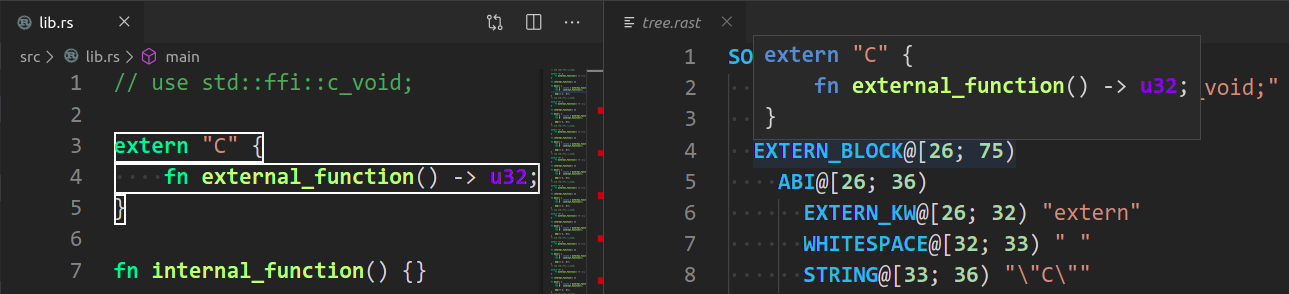 + # Profiling We have a built-in hierarchical profiler, you can enable it by using `RA_PROFILE` env-var: diff --git a/docs/user/features.md b/docs/user/features.md index 4cba6652944..56d2969fd43 100644 --- a/docs/user/features.md +++ b/docs/user/features.md @@ -81,16 +81,6 @@ Join selected lines into one, smartly fixing up whitespace and trailing commas. Shows the parse tree of the current file. It exists mostly for debugging rust-analyzer itself. -You can hover over syntax nodes in the opened text file to see the appropriate -rust code that it refers to and the rust editor will also highlight the proper -text range. - -If you press <kbd>Ctrl</kbd> (i.e. trigger goto definition) in the inspected -Rust source file the syntax tree readonly editor should scroll to and select the -appropriate syntax node token. - -<img src="https://user-images.githubusercontent.com/36276403/78043783-7425e180-737c-11ea-8653-b02b773c5aa1.png" alt="demo" height="200px" > - #### Expand Macro Recursively Shows the full macro expansion of the macro at current cursor. |